
Expense and budget management system
We develop expense management systems for companies with departments, business travel and corporate cards. Employees photograph receipts, managers approve expenses on their phones, department budgets show planned and actual spending, and accounting receives ready-to-use documents.
Based on last 100+ reviews


When does a company need its own expense management system?
How is an employee expense processed?
-
ExpenseThe employee pays with a company or personal card and photographs the receipt in the app.WhoEmployeeThe amount and VAT are recognised automatically.
-
ApprovalThe manager approves the expense on their phone, while expenses over the limit go to the finance director.WhoManagerRules by amount and expense category.
-
BudgetThe expense is immediately reflected in the department and project budgets, with the remaining balance visible every day.WhoSystemAn alert at 80% of the budget.
-
AccountingVerified expenses with receipts are sent to the accounting software, and employees are reimbursed for personal spending.WhoAccountantThe accountant sees only exceptions.
What modules does the expense management system include?
Expenses with approval workflows, budgets and accounting exports come from the business finance system. These modules are added for employee expenses.
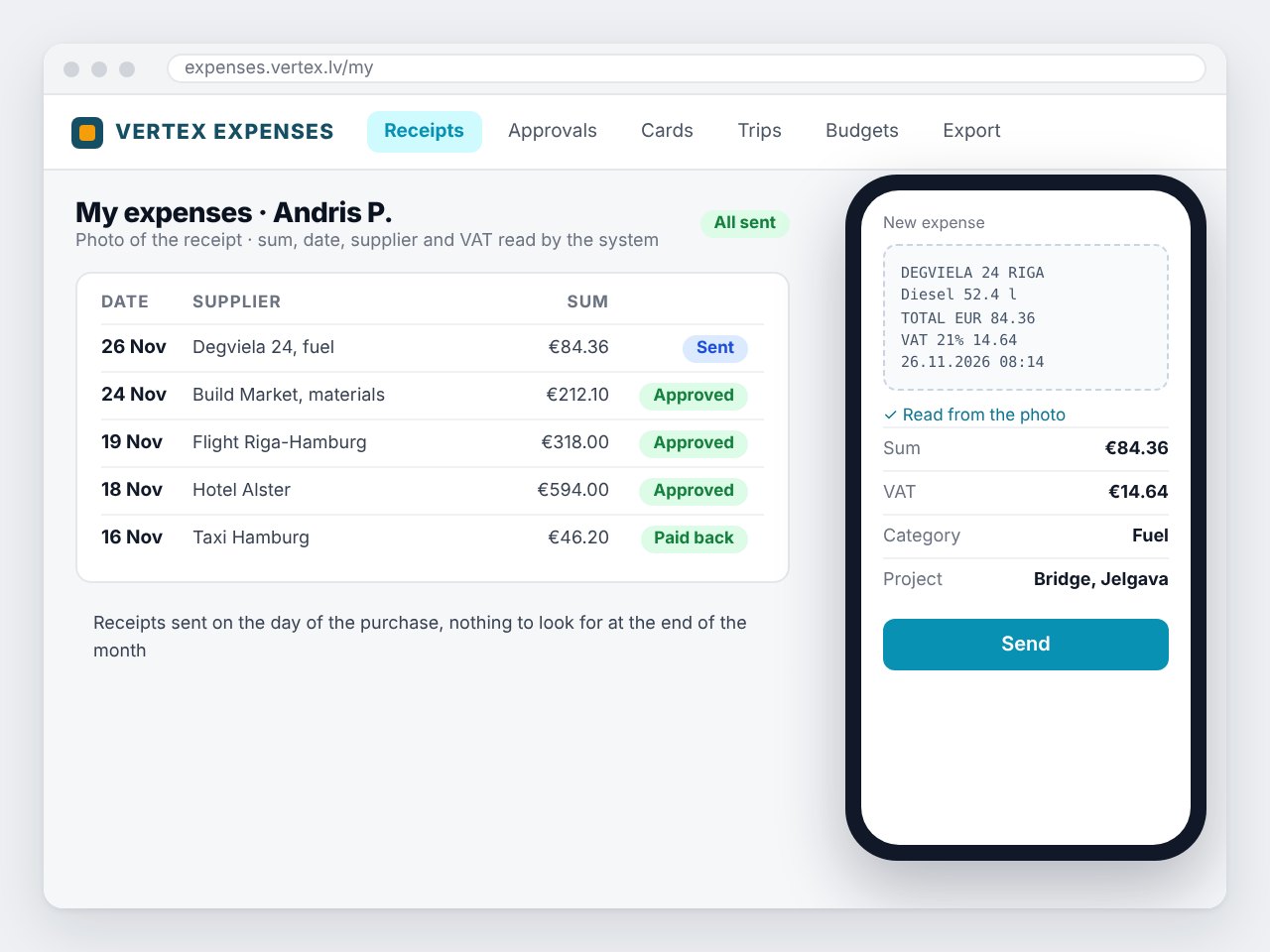
Receipts from your phone
The employee photographs a receipt, and the system recognises the amount, date, supplier and VAT and suggests an expense category.
Example: Receipts are submitted on the day of purchase, so accounting does not have to look for lost slips of paper at the end of the month.
Receipts in envelopes.
Receipt submitted in a minute.
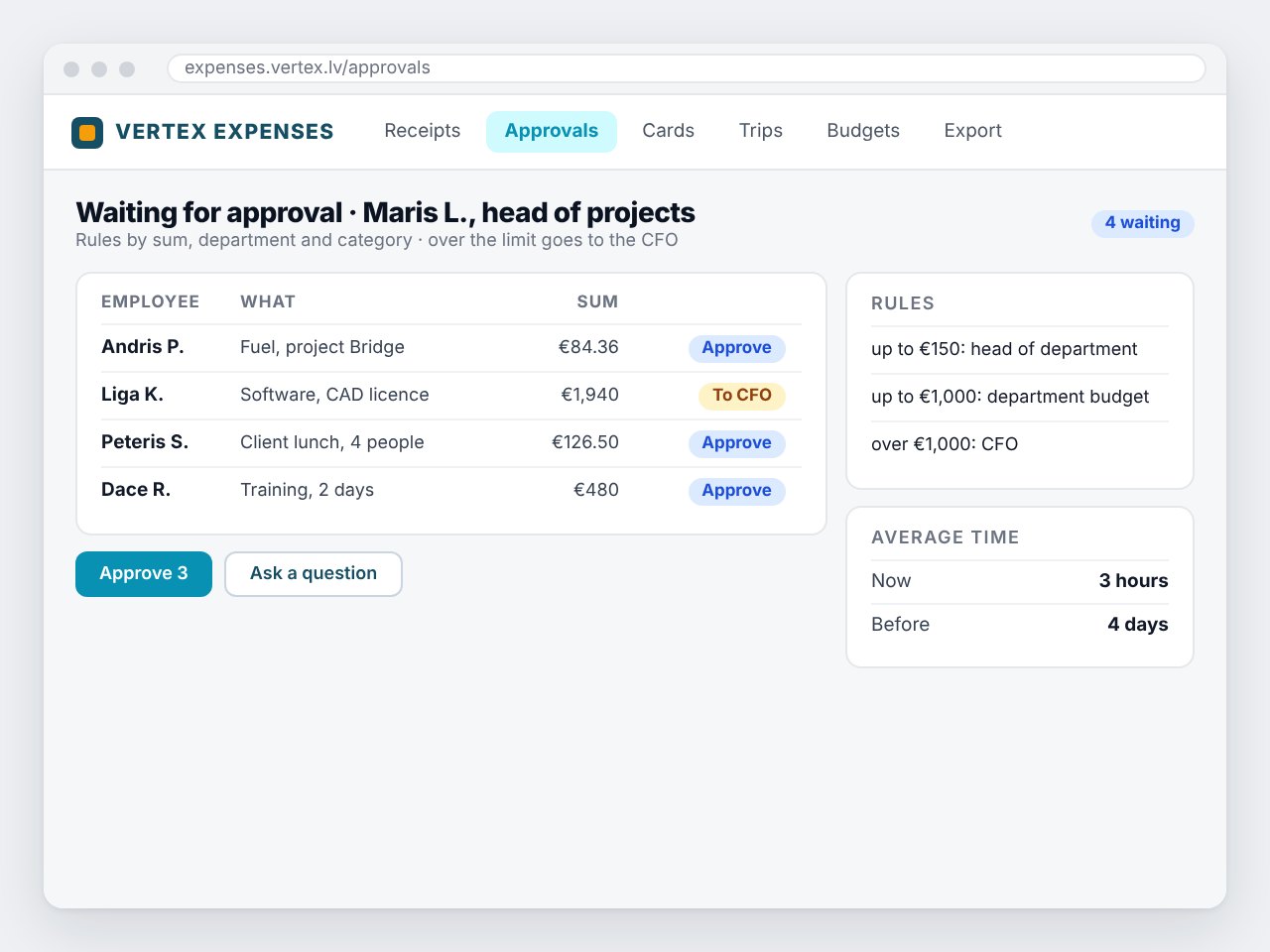
Expense approval
Approval rules by amount, department and expense category: managers approve expenses on their phones, while expenses over the limit go to the finance director.
Example: Expense approval takes an average of 3 hours instead of 4 days of correspondence.
Emails and phone calls.
Approval on your phone.
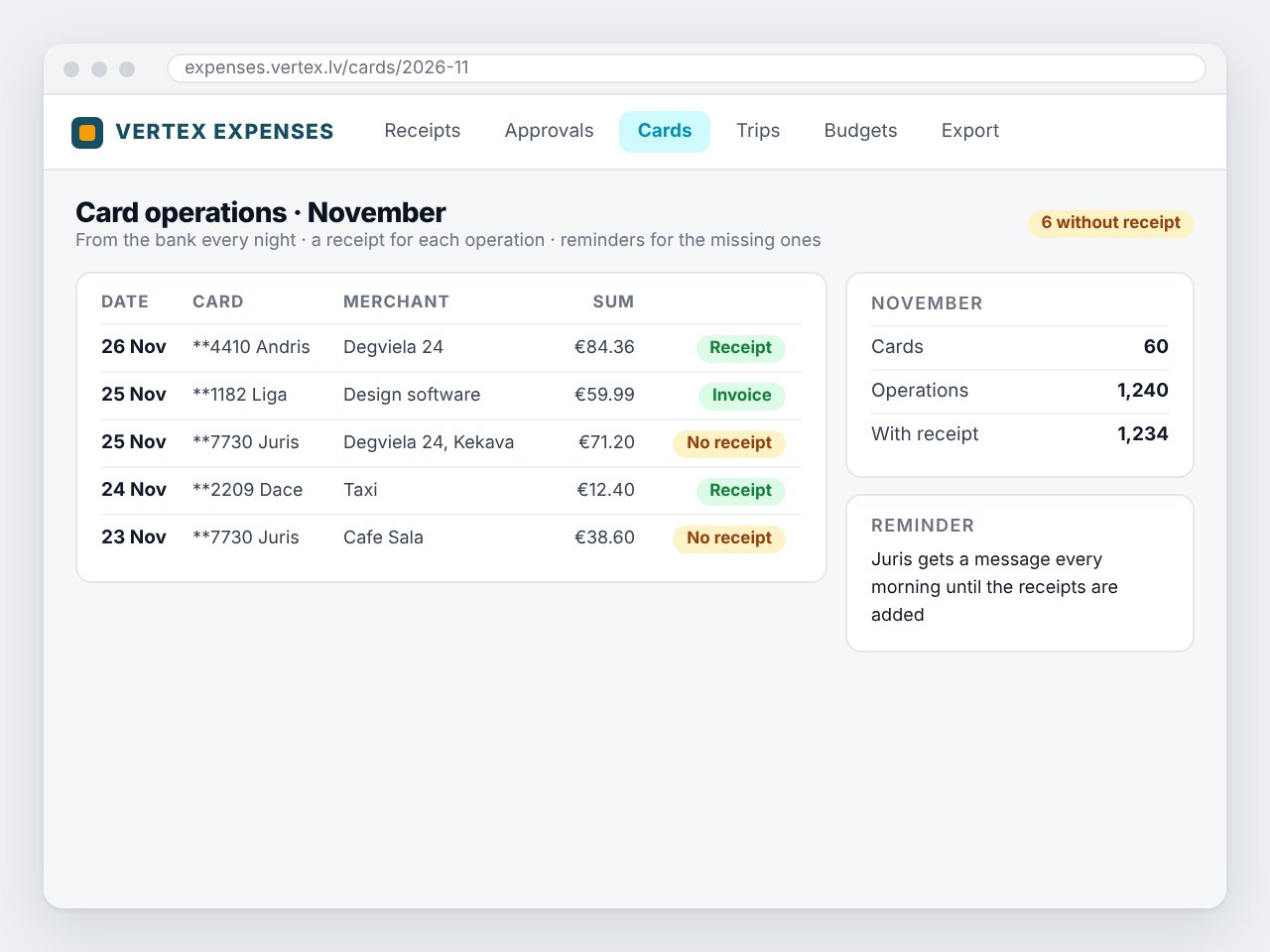
Corporate cards
Corporate card transactions are imported from the bank, employees attach a receipt to each one, and the system sends reminders for missing receipts.
Example: All 60 company cards are reconciled against receipts by the 3rd of the following month.
Manual reconciliation.
Automatic transaction imports.
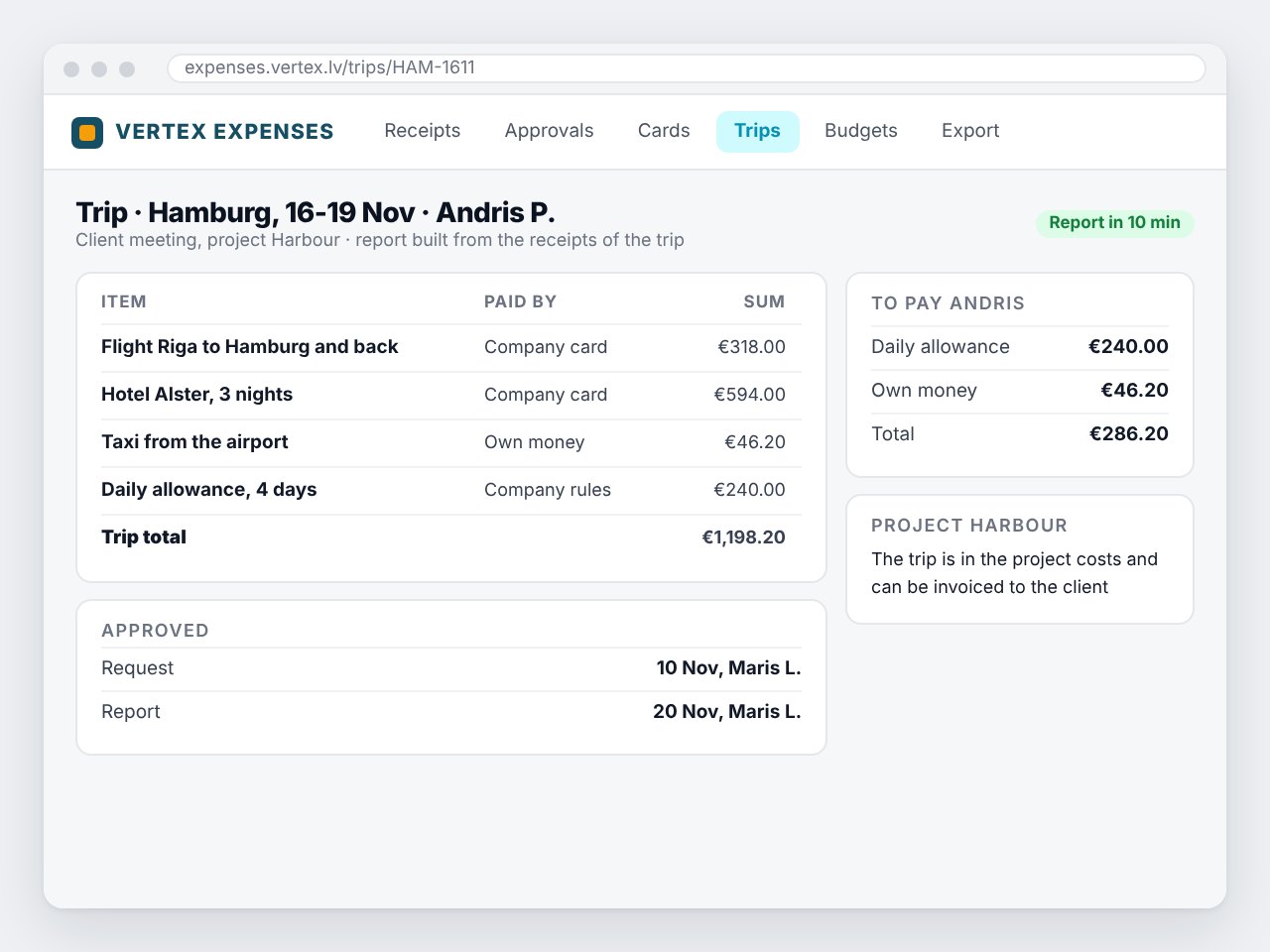
Business trips
Business travel requests, daily allowances by country, tickets and hotels, with expense reports compiled from trip receipts.
Example: A business trip expense report is compiled in 10 minutes, and daily allowances are calculated according to the country's rules.
A week to prepare a report.
Reports from receipts.
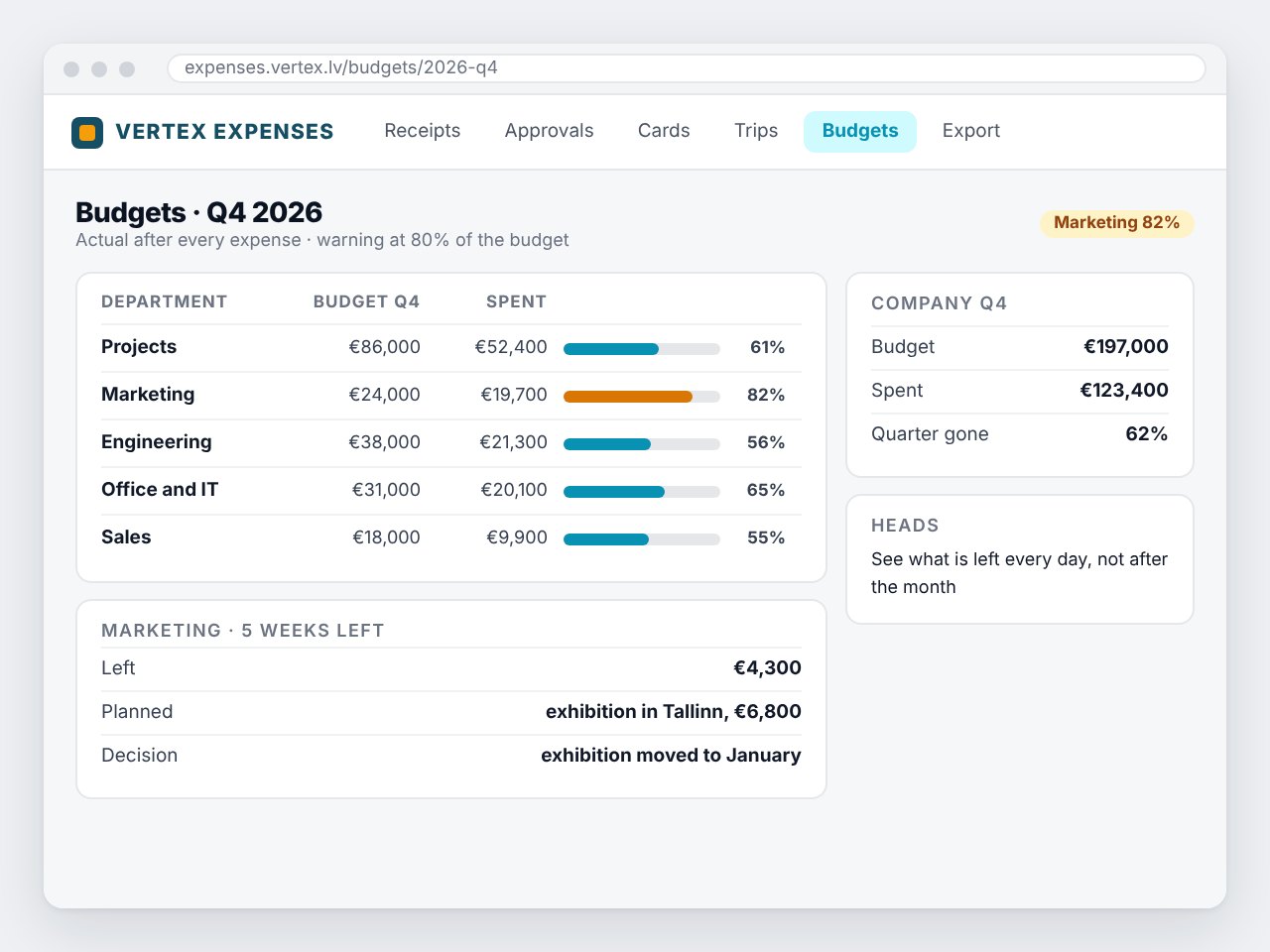
Department budgets
Budgets by department, project and expense category, with actual spending updated after every expense so department managers can see the remaining balance.
Example: The manager saw that marketing had spent 82% of its quarterly budget and postponed the exhibition until January.
Overspending discovered after month-end.
Remaining balance visible every day.
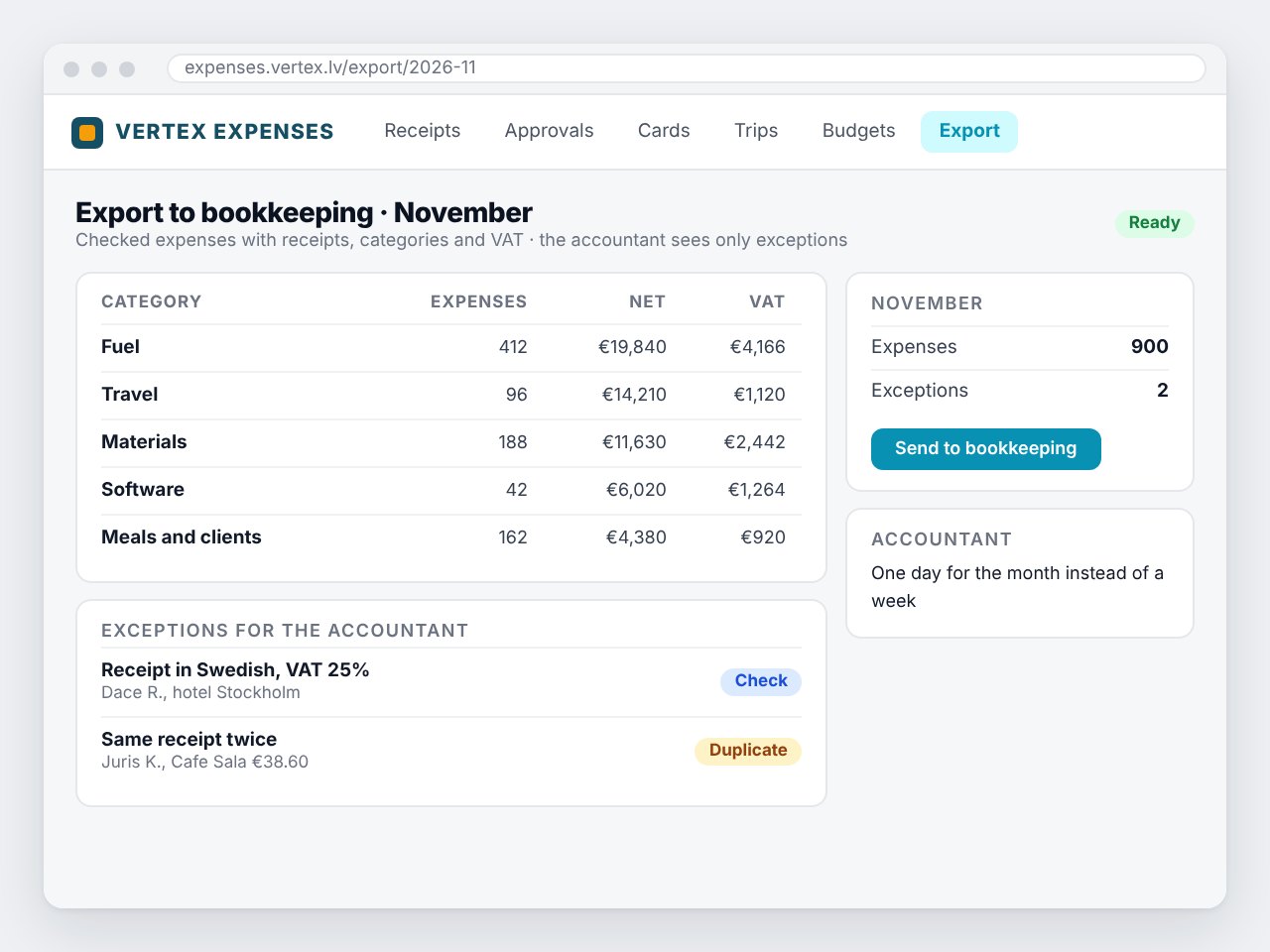
Export to accounting software
Verified expenses with receipts, categories and VAT are sent to the accounting software, and the accountant sees only exceptions.
Example: The accountant processes 900 monthly expenses in one day instead of a week.
Manual entry.
One-click export.
What can AI add?
Receipt recognition. AI reads receipts in any language and fills in the expense details.
Policy checks. AI identifies duplicates, personal purchases and expenses that breach company policy.
Budget forecasting. AI warns which department will exceed its budget by the end of the quarter.
Questions in plain language. The finance director asks about expenses in plain language and gets an immediate answer.
How does the project work?
-
Brief and technical specificationWe review your requirements and prepare a brief. For projects starting at €5,000, we also prepare a technical specification, which sets the basis for the fixed price.Timeframeup to 5 daysTechnical specification: around 5 working daysWork starts within 3 working days of receiving the advance payment.
-
Development in stagesWe demonstrate each stage in a demo environment and submit it by email. You accept it by replying or paying the next invoice.Timeframe3-10 weeksbasic version 3-5 weeks, expense management system 6-10 weeks
-
LaunchWe configure expense categories, limits and approval rules, connect your bank and accounting software, give employees the app and review the first month of expenses together with your accounting team. After full payment, you own the source code.Timeframearound a weekDeployment to hosting, launch and testing on the hosting server are included in the price.
-
Warranty and further development6 months of warranty and support free of charge. After that, you can opt for an extended warranty, which includes hosting.Timeframe6 monthsfree of chargeNew modules are added in stages.
How much does an expense management system cost?
Basic version
-
Support
- Initial implementation support
- Basic documentation and training
- 6 months of post-launch support
-
Functionality
- Receipts from your phone
- Receipt recognition
- Approval
- Expense categories
- Export to accounting software
-
Integrations
- Accounting software
-
Extended warranty
-
Included in the price: deployment to your hosting and launch. The first 6 months of warranty and support are free of charge.
-
Expense management system
-
Support
- Introductory training and training sessions
- 6 months of support with the option of extended support
-
Functionality
- Everything in the basic version
- Corporate cards
- Business travel and daily allowances
- Department budgets
- Limits and rules
- Expense reports
- Employee app
-
Integrations
- Banking
- Accounting software
- Booking services
-
Extended warranty
-
From €150 per month: includes VPS hosting, priority support and fixes for critical and logic errors.
-
Large-scale expense management system
-
Support
- Introductory training and training sessions
- 6 months of support with the option of extended support
-
Functionality
- Everything in the expense management system
- Multiple companies
- Currencies and country-specific VAT
- Project budgets
-
Integrations
- ERP
- Any systems via API
-
Extended warranty
-
Priced according to project scope. Everything in the extended warranty (VPS hosting, priority support, fixes for critical and logic errors), plus full coverage: fixes for all types of errors and replacement of the provider or API if external integrations become unstable or outdated.
-
Shall we make a prototype?
With the most advanced AI solutions we build a clickable, interactive prototype of your system in one working day. With realistic test data, ready for presentations and further system design.
- Clickable main screens, made by AI
- A link to share with your team
- The scope of the first version
- A fixed price for the development
No obligation: you pay only for the prototype.
Similar projects:
Cryptocurrency company (anonymous)
Cryptocurrency exchange

Latvia
The client emphasized that the platform was vital to their operations and that they couldn’t function without it.
They appreciated 2410’s responsiveness, adaptability, and ability to deliver complex functionality - including fee logic, API integrations, and automation.
Communication was clear and proactive. The project evolved into a trusted long-term collaboration, with future expansions already discussed and initiated.
Riga Plaza
Shopping center
Latvia
Thank you!! Everything looks really great. You are incredibly fast! Huge thanks! Perfect! The client approved it. Please send the files.

Eliard SIA
Real estate
Latvia
Eliard praised the collaboration with 2410 for its adaptability, solution-oriented communication, and high-quality execution.
The project had complex requirements and tight deadlines, yet was handled efficiently. Additional feature requests were considered promptly, showing 2410’s flexibility and reliability in delivering tailored real estate platforms.


Who needs an expense management system?
Engineering and construction companies
Trading companies
Consulting and IT
Education and non-profit organisations
Other solutions based on the business finance system
The same business finance system, configured for a different task.
Fixed price and code ownership:
The project is divided into stages, each with a fixed price. We demonstrate each stage in a demo environment and submit it by email. You accept it by replying or paying the next invoice.
-
Handover. Source code repository and server access credentials.
-
Hosting. Migration is included in the price: to a DigitalOcean cloud server or your company's server.
-
Team. The 2410 team works remotely with clients from any country.
-
Contract and NDA. The contract is signed electronically. An NDA is available on request.